
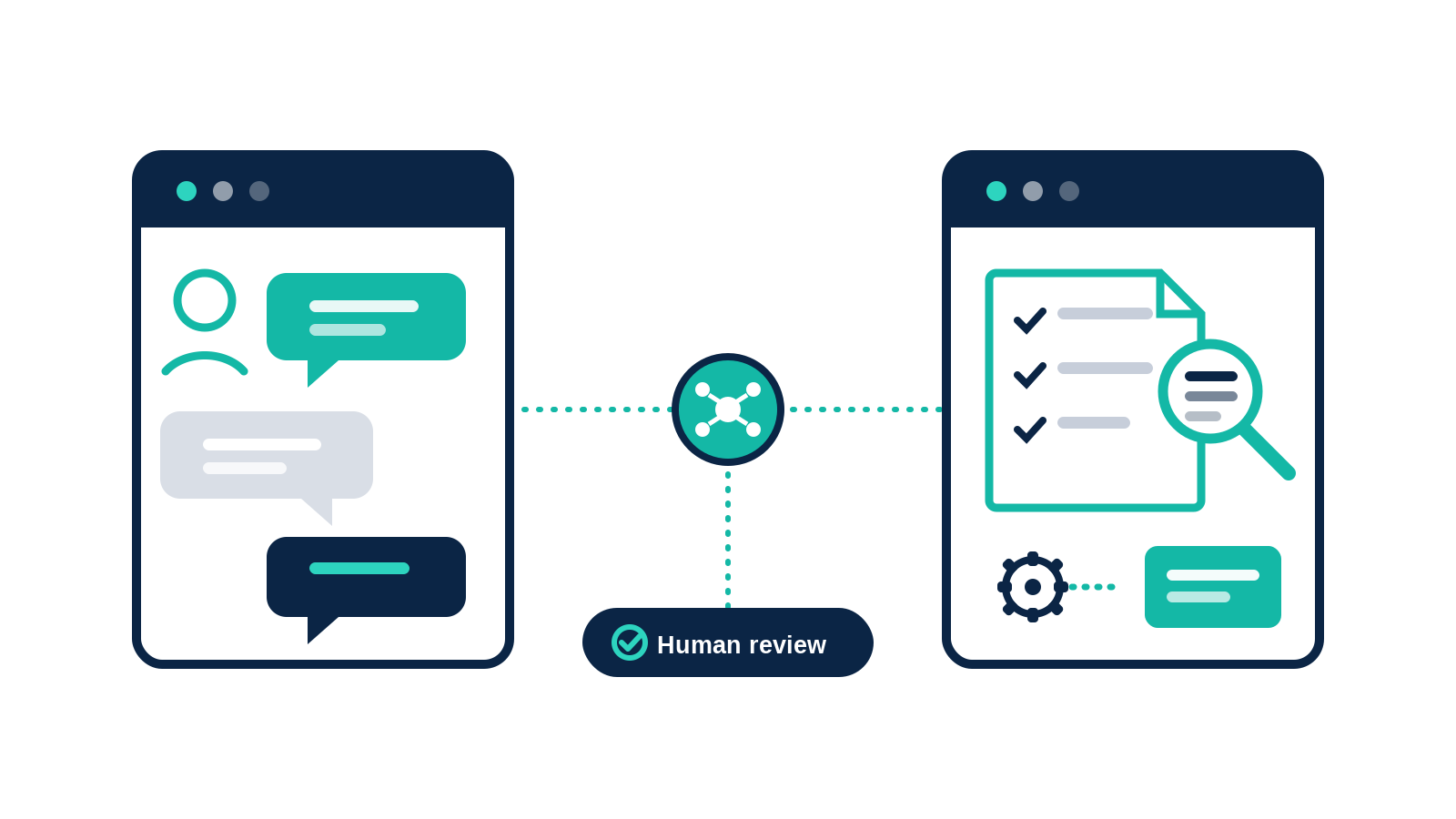
If you are comparing AI chatbot vs AI assistant options, the honest answer is that the name on the box will not decide it for you. What matters is who the system serves, what information it can reach, and what it is allowed to do with that information. This article compares the two setups businesses usually weigh first, a customer-facing chatbot and an internal AI assistant.
Those are practical use cases, not universal definitions: chatbots can serve employees, and assistants can serve customers. Many businesses end up needing the first, some need the second, and a growing number use both, often built on the same underlying technology. This guide walks through the real differences, where the two overlap, and the questions that lead to the right choice.
What “AI chatbot” usually means
A chatbot is software that holds a conversation through text or voice, most often on a website, in a messaging app, or inside a support portal. Its job is to understand a visitor’s question, respond from approved information, guide the person through a simple process, or pass the conversation to a human when it reaches its limit. In the customer-facing use case this article starts with, an AI chatbot typically:
- Answers recurring questions about services, prices, hours, policies and next steps.
- Uses information approved for that audience: public website content, help articles and product information for open chat, and, once a customer has signed in, that customer’s own details where they are authorised to see them.
- It does not get the run of your internal files.
- Collects inquiry details, such as contact information and what the visitor needs, so your team can follow up.
- Hands the conversation to a person when the question is sensitive, unusual or outside its scope.
Some chatbots follow fixed scripts and menus. Others use language models to handle questions phrased in different ways.
Either way, in this use case the chatbot faces outward, toward customers and prospects. Audience is the organising idea for the comparison in this article.
It does not define the technology, because the same kind of chatbot can also serve employees inside a business. For a deeper look at that side, see our guide to planning an AI chatbot for customer support and our article on what to automate and when to involve your team.
What “AI assistant” usually means
In the internal use case covered in this article, an AI assistant works for your staff: instead of talking to the public, it helps employees find information, prepare work and move routine steps along inside the business. That is a use case, not a boundary. An assistant can also serve customers directly, working within whatever access those customers are given. A typical internal assistant might:
- Search approved internal documents and answer with a reference to the source, so the employee can check it.
- Summarise long documents, meeting notes or email threads.
- Draft a reply, report or proposal for a person to review and send.
- Prepare an action in another tool, for example, drafting a ticket or a follow-up task, that only goes ahead after someone approves it.
Workplace assistants such as Microsoft Copilot illustrate the pattern: Microsoft describes Copilot as grounding its answers in your organisation’s files, emails and meetings while respecting the permissions each user already has. The assistant does not get a master key. It works within each employee’s existing access, which is exactly why permissions become a central design question. Our guide to building an internal AI knowledge assistant covers that project in detail.
Where the two overlap
The labels are less tidy than product pages suggest. IBM’s reference guide on chatbots notes that these terms have no universal definitions and are often used interchangeably, and that organisations use chatbots to support customers, employees and partners alike.
Modern AI chatbots can connect to business applications, retrieve information and complete transactions, while many AI assistants include chatbot-style conversation as their interface. In practice, the overlap looks like this:
- Both use conversation as the interface. Typing a question does not tell you which one you are using.
- Both can retrieve knowledge. One deployment might search public help content; another, internal documents; an authenticated one, the signed-in customer’s own records.
- The mechanism is similar. What differs is the sources and permissions set for that deployment.
- Both can be connected to other tools. A chatbot might check an order status or book an appointment. An assistant might create a draft task in your project tool. Actions are a design choice, not a property of the label.
- Both need human backup. Neither should be the final word on a sensitive, disputed or high-impact matter.
So the useful question is not “which label is better?" It is “who will use it, with which information, and with what level of permission to act?”
The four questions that actually decide it
1. Who is it for?
As a starting heuristic, a problem in customer conversations points to the chatbot use case, and a problem in staff work points to the assistant use case. It is a guide to where to start, not a rule about who either technology can serve. If both groups struggle, visitors cannot get basic answers and staff cannot find internal information, you may be looking at a combined project, ideally phased.
2. What information must it reach?
What matters is the access design, not the label. A public chatbot that anyone can open should work only from information you are comfortable making public: service descriptions, published pricing guidance, policies and FAQs. Once a customer is authenticated, a chatbot may also use that customer’s own information, orders, account details, service history, limited to what that person is authorised to see and to what the task requires.
An assistant used internally often needs internal sources such as procedures, contracts, project files and HR policies. Whenever access goes beyond public information, identity, permissions and task scope have to be designed deliberately, along with a plan for keeping documents current.
3. What is it allowed to do?
List the permitted actions explicitly. Answering questions is the lowest-risk tier.
Collecting and passing on an inquiry is next. Preparing drafts for approval is a further step.
Changing records, sending messages or confirming bookings without review is the highest tier, and it needs the strongest testing and oversight. Decide the tier before anyone builds anything.
4. Who reviews, and who owns it?
Someone in your business needs to own the content, review a sample of conversations, and update the system when your services, prices or policies change. An unowned chatbot keeps quoting last year’s prices.
An unowned assistant keeps citing a superseded procedure. Maintenance is part of the product, not an optional extra.
Side-by-side comparison
The rows below describe the two use cases compared in this article: a customer-facing chatbot and an internal assistant. Read them as typical starting configurations, not universal definitions: either technology can serve the other audience, and what each deployment can reach is set by identity, permissions and task scope.
Intended users
- AI chatbot: Customers, prospects and website visitors
- AI assistant: Employees and internal teams
Main tasks
- AI chatbot: Answer recurring questions, explain services, collect inquiries, route people to the right team
- AI assistant: Find internal information, summarise documents, draft content, prepare routine workflow steps
Information sources
- AI chatbot: Public or publishable content (website pages, help centre, product and policy information approved for customers), plus, for authenticated customers, their own authorised account and order information
- AI assistant: Internal sources: procedures, contracts, project files, HR and operations documents, limited by each user’s permissions
Integrations and permitted actions
- AI chatbot: Website chat, contact and inquiry forms, CRM lead capture, appointment or order-status lookups where approved
- AI assistant: Document stores, email and calendar tools, ticketing and project systems; usually prepares actions for approval rather than completing them silently
Human oversight
- AI chatbot: Clear handoff to a person for sensitive, complex or unresolved conversations
- AI assistant: Review and approval for drafts, decisions and any action that changes records or contacts customers
Maintenance requirements
- AI chatbot: Keep public answers, prices and policies current; review unanswered questions
- AI assistant: Keep internal documents current, manage permissions as staff join or leave, review answer quality and sources
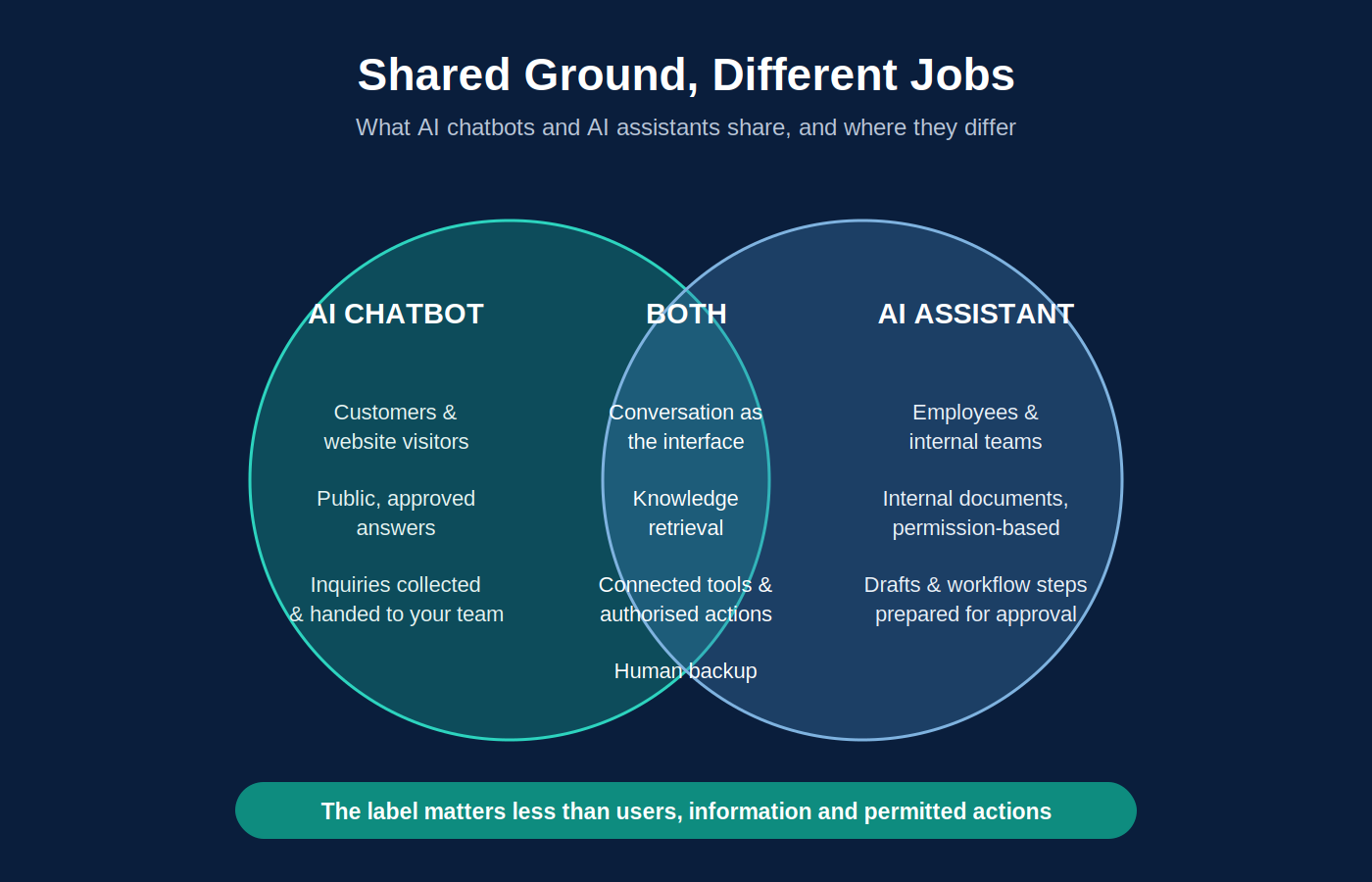
Chatbots and assistants share more than their labels suggest. The differences are the users, the information and the permitted actions.
When a chatbot is enough
A customer-facing chatbot is usually sufficient when the problem lives on your public channels and the answers already exist in publishable form. Hypothetical example: A home services company receives the same website questions every day: which areas it covers, how booking works, what a first visit includes.
A chatbot answers those questions from the company’s approved service pages, asks a visitor who wants a quote for their name, phone number and a short description of the job, and passes the inquiry to the office team. Nothing internal is exposed, no system is changed without a person involved, and the team stops retyping the same replies. Choose the chatbot route when:
- Most incoming questions are repetitive and already answered somewhere public.
- The goal is faster first responses and cleaner inquiry capture.
- A person will still handle quotes, complaints and anything sensitive.
If budget is part of the decision, our breakdown of AI chatbot development cost explains what drives the price up or down.
When an assistant is justified
An assistant earns its place when the bottleneck is inside the business: staff losing time hunting for information, re-reading long documents, or drafting the same kinds of responses from scratch. Hypothetical example: A new support employee needs the current returns procedure. Instead of searching three drives, they ask the internal assistant, which answers from the approved procedures folder and links to the source document.
The employee checks the source before advising a customer, because the assistant is a finding aid, not an authority. Hypothetical example: A project coordinator asks the assistant to prepare a draft reply to a client email, using the project file for context. The assistant drafts it and stops.
The coordinator edits and sends it. The system prepared work; a person remained accountable for it. Choose the assistant route when:
- Employees repeatedly ask questions that approved internal documents already answer.
- Drafting and summarising consume hours your team could spend on judgement calls.
- You can name who owns each document source and who can access it.
When a combined approach makes sense
Some businesses genuinely have both problems: visitors cannot get basic answers, and staff cannot find internal ones. A combined approach can share one governed knowledge process, the same discipline of approved sources, ownership and review, while keeping two separate surfaces:
- A public chatbot that only ever sees publishable content and customer-safe actions.
- An internal assistant, behind login, that respects staff permissions and prepares work for approval.
Keep access separated by audience and purpose even if the technology is shared. Letting an unauthenticated public chatbot reach internal sources, or opening an internal assistant to the public without review, is how a sensible project becomes a privacy incident. Phase the work: launch the side with the clearer payoff first, prove the maintenance routine, then add the second.
AI chatbot vs AI assistant: a quick decision checklist
Work through these questions in order. The first clear “yes” usually names your starting point.
- Are customers and visitors asking the same questions and waiting too long for simple answers? Start with a chatbot.
- Do employees lose time searching documents, folders and old threads for answers that already exist? Start with an assistant.
- Does the system need to touch internal or customer records? Write down exactly which records, and whether it reads them, drafts changes, or changes them directly.
- Can you name the person who will own the content and review conversations each month? If not, assign that before building.
- Is there a clear handoff to a human for sensitive or unresolved cases? If not, design that first.
- Are your source documents current and consistent? If not, fix the worst gaps before connecting any AI to them.
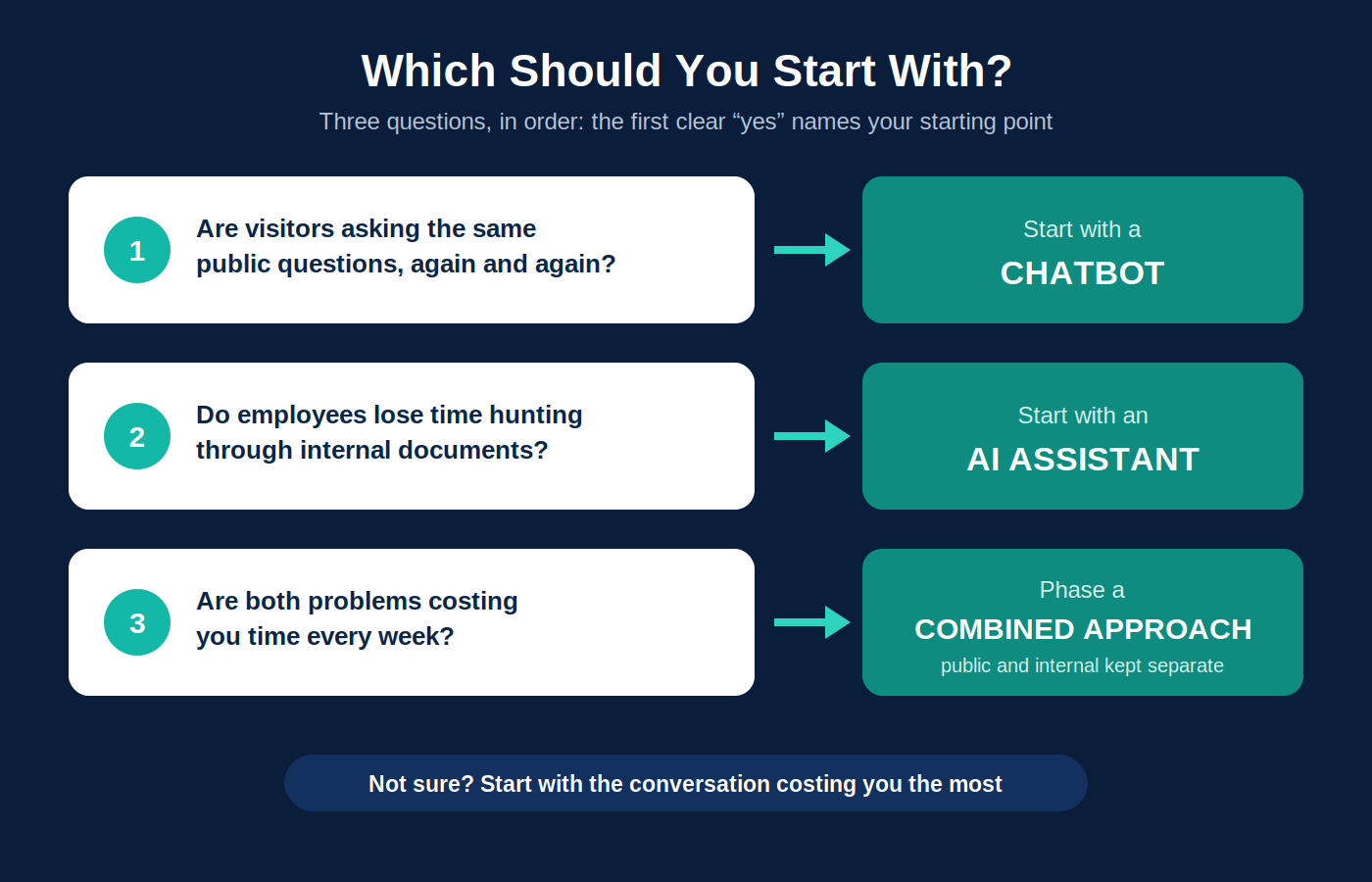
Start with the first clear yes, and with the conversation that is costing you the most.
Questions to clarify before hiring a development team
- Which audience and which three to five tasks are in scope for the first version?
- Which information sources will it use, who owns each one, and how are updates handled?
- Which actions may it take on its own, which need approval, and which are out of scope entirely?
- How does it behave when it does not know, does it say so and route the person somewhere useful?
- What conversation data is stored, who can see it, and when is it deleted?
- How will accuracy be tested before launch, and who reviews real conversations afterwards?
- What does maintenance cost, and what happens when your content, tools or team change?
Before choosing a provider, work through these questions with them and ask for clear, specific answers. If the answers stay vague, treat that as a sign that the requirements need clarifying before any building starts.
Frequently asked questions
Can one system be both a chatbot and an assistant?
Yes. The labels describe deployments rather than different kinds of technology, and the same platform can power a customer chat window, an internal assistant, or both.
Treat each deployment separately anyway: different audiences, different information, different permissions. Configure and test each surface on its own terms.
Is an AI assistant automatically more secure than a chatbot?
No. Security depends on authentication, permissions, data handling and review, not on the label. An assistant connected to internal documents needs stricter access control than a public chatbot that only reads published pages, because it has more to protect.
Do we need an assistant if we already have good internal search?
Maybe not. If employees already find current documents quickly, an assistant adds little. It earns its place when search results still leave people reading long documents, combining sources, or drafting from what they found.
Should we start with the more capable option to save time later?
Usually no. A focused first version, one audience, a small set of tasks, clear oversight, is faster to test and easier to trust. Add capabilities when real usage shows they are needed, not in anticipation.
A practical recommendation
Start from the conversation that is costing you the most today. If it is with customers, start with the chatbot use case: approved public information, authenticated access to a customer’s own details where that genuinely helps, and a reliable human handoff.
If it is inside your team, start with the assistant use case: a small set of well-kept documents, sources shown, and approval steps where they matter. If it is both, phase them, and keep each side’s access limited by its audience, identity checks and task scope.
If you would like a second opinion on your AI chatbot vs AI assistant choice, DevxerTech builds both. See our chatbot development services and our AI assistant and automation services, or simply bring us your checklist answers and we will help you scope a sensible first version.

