
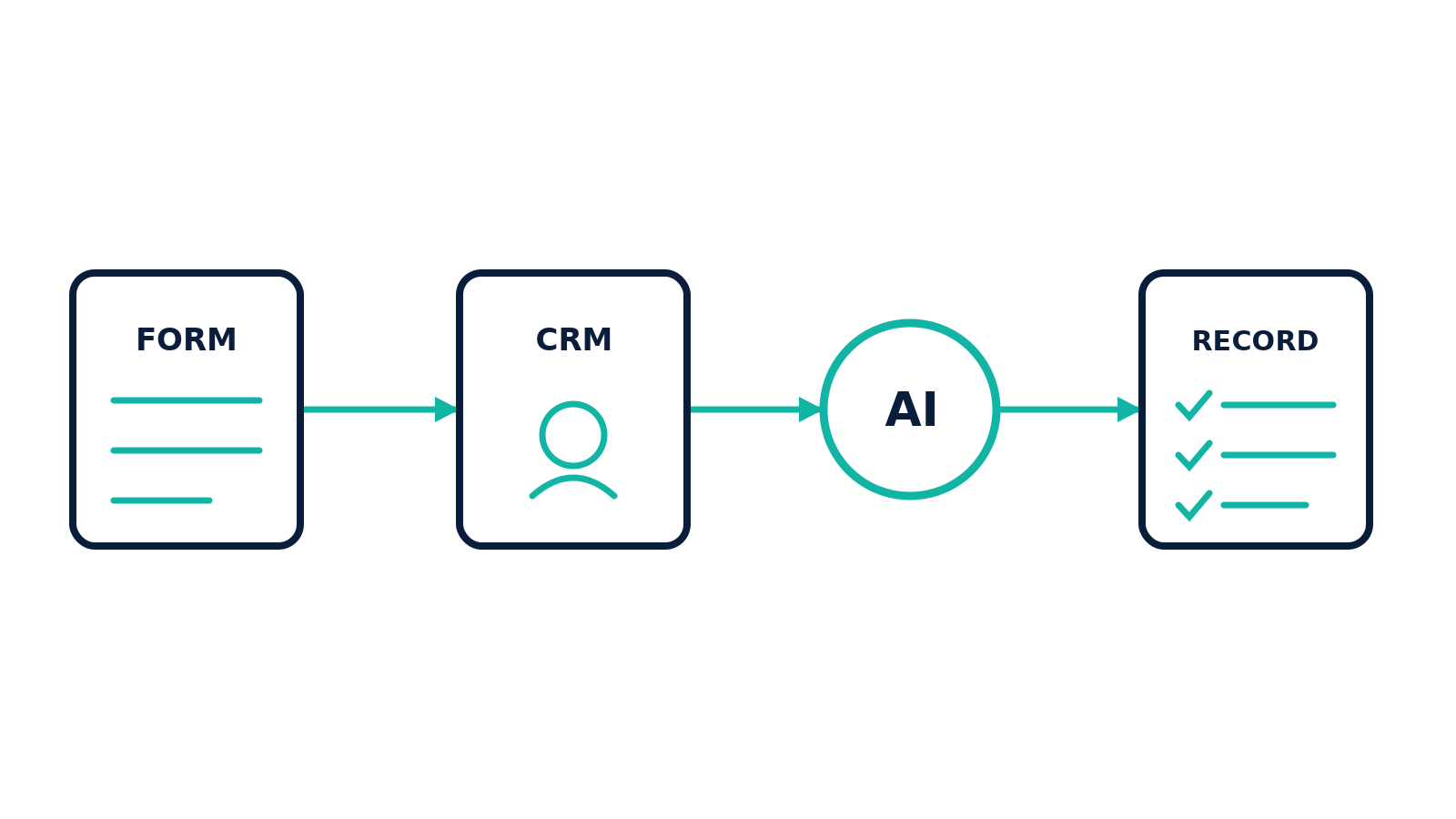
Ask a small business owner where the admin time goes and the answer is rarely the skilled work. It is the copying in between.
A customer enquiry is read in the inbox, typed into a spreadsheet, copied into the CRM, and copied again into the accounts package when the job is won. Each copy takes a few minutes and carries a small chance of a typo, a missed field or a forgotten follow-up.
AI workflow automation for small business is best approached as a connection problem before it is an AI problem. Start by mapping one process as it moves between the tools your team already uses.
Then sort each step: some steps only need the tools connected, some follow fixed rules, a few genuinely benefit from AI, and some should stay with a person. Automate in that order and the first workflow stays small enough to supervise. This guide works through that method: what an automated workflow is made of, how to find the handoffs worth fixing, how to sort the steps, what to check before connecting anything, and how these workflows fail when nobody is watching them.
What AI workflow automation for small business is made of
Strip away the product names and every automated workflow has the same four parts. Trigger. The event that starts the workflow: a form is submitted, an invoice is approved, a date arrives, a record changes status. Nothing runs until the trigger fires, which is why the trigger has to be an event your tools can actually detect.
Steps. The actions that do the work, in order: create a record, send a message, copy a value, prepare a document, notify a person. Each step takes the output of the one before it.
Connections. The links between your tools that carry the data from step to step. A connection is what removes the copying. It is also where most of the practical difficulty lives, because each tool names and formats its data slightly differently.
Checks. The points where the workflow verifies something or hands over to a person: a total that must match, a field that must not be empty, a message that needs approval before it is sent.
The model is not new, and it is not specific to AI. IBM’s workflow documentation describes a workflow as a container that starts with a trigger, followed by steps containing the actions that do the actual work.
AI changes what some of those actions can do. A step can now read an email, extract fields from a document or draft a reply in context, instead of only moving fixed data between fields.
That distinction decides where you start. If your painful steps are mostly copying and chasing, most of your first workflow will be connections and rules, with AI used only where the input arrives as messy human text.
Start with the handoffs, not with a platform
Most buying advice starts with a list of automation platforms. The platform question is real, but it comes second.
A workflow built on an unmapped process automates the confusion along with the work, and the team ends up maintaining a faster version of the same muddle. Start with one process and a piece of paper. Walk it from arrival to done and write down four things:
- Where the work arrives, and what sets it off
- Which tools it passes through, and in what order
- At each move, what a person copies, retypes, checks or chases
- Where the work waits, and who notices when it has waited too long
The handoffs are the moves between tools and between people, and they are where the time and the errors concentrate. The work inside each tool is usually the skilled part.
The copying between tools is not skilled, not checked properly, and not owned by anyone. Choose the process with the most manual handoffs relative to how often it runs. A process that runs twice a day with six copying steps is a better first candidate than a monthly process with two.
For a fuller method of weighing candidates, including risk and information quality, see our guide to choosing your first AI automation project. This article stays with what happens after that choice: how the chosen process gets connected and automated.
Sort every step before you automate anything
With the map in front of you, put each step into one of four groups. The groups matter more than any tool decision, because they decide what kind of work each step needs.
Connect it. The data already exists in one tool and is needed in another, unchanged.
A submitted form becomes a CRM record. A confirmed order becomes an invoice draft.
No judgement is involved, so no AI is needed. A surprising share of small business admin is in this group, and it is the cheapest to fix.
Automate it with a rule. The decision is fixed in advance and can be written down exactly: if no reply arrives within three days, create a follow-up task; if an order value passes a set threshold, route it for approval.
Rules are predictable and easy to audit afterwards, which makes them the right tool wherever the condition is exact. Add AI where the input is unstructured. Some steps begin with material that has no fixed shape: a free-text enquiry, a PDF attachment, a long email thread.
This is where AI earns its place, reading, classifying, extracting and drafting. Our guide to AI document processing for small business follows one such chain in detail, from a document arriving to a checked record a person can approve.
Keep it human. Pricing a non-standard job, judging a complaint, approving anything that commits money or makes a promise to a customer.
Keeping these steps with a person is not a gap in the automation. It is the design choice that makes the rest of the chain safe to run unattended.
In most first workflows, connections and rules do the bulk of the work and AI handles one or two steps. That balance is a strength. Every AI step adds some variability that has to be checked, so AI should be bought only where the input genuinely varies in ways a rule cannot describe.
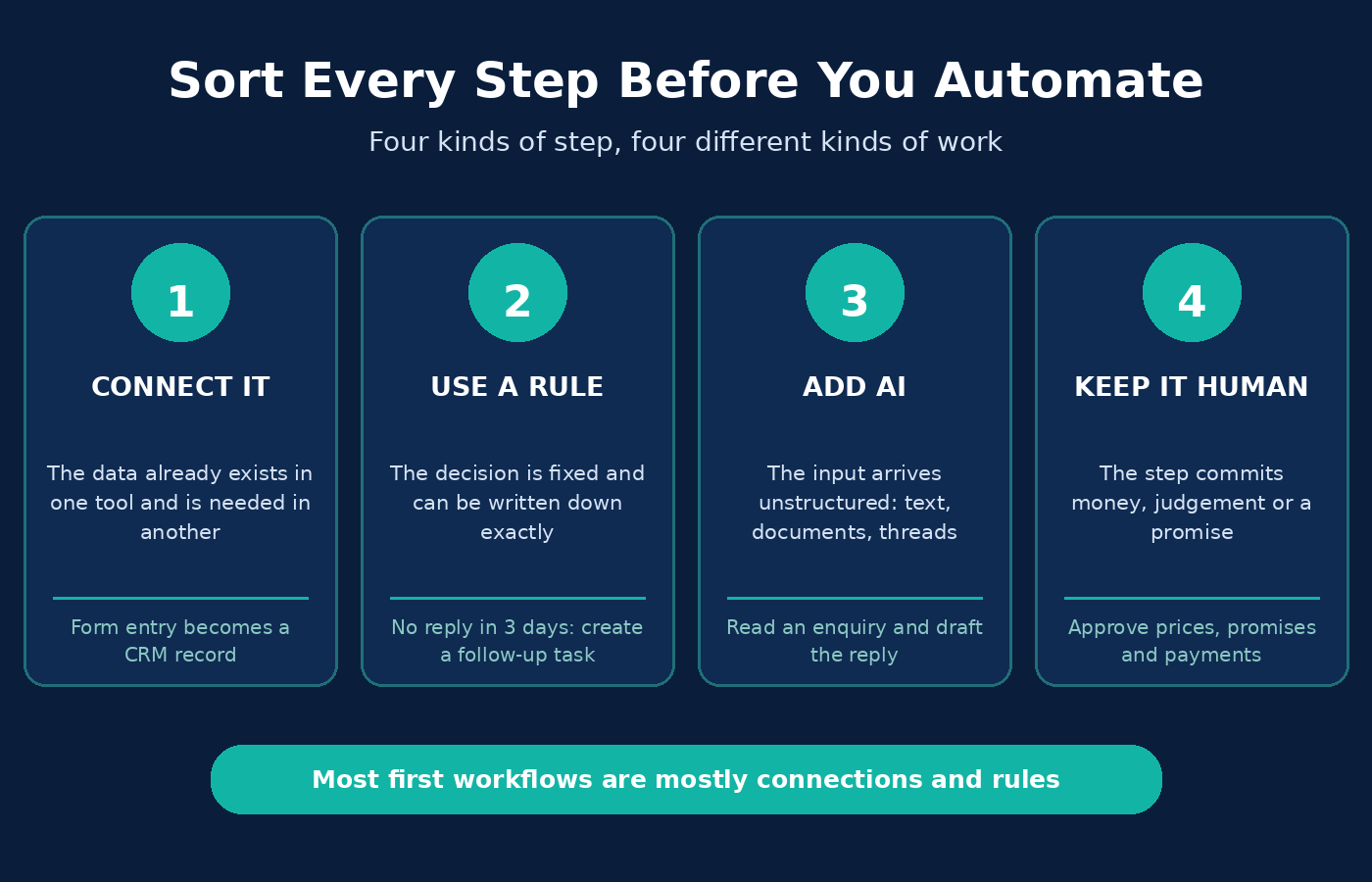
Four kinds of step. Most first workflows are mostly connections and rules.
Five checks before you connect your tools
Connections fail quietly when the basics underneath them are untidy. These five checks come before any building, and none of them needs new software.
- Names and fields match. The same customer appears as “J Smith" in one tool, “John Smith" in another and “Smith Ltd” in a third, and no connection can tell they are one customer.
- Agree the standard form for names, email addresses, dates and amounts before connecting anything.
- Each tool allows the access you need. Integrations, exports and API access are limited or absent on some plans. Confirm the connection is possible on the plans you actually pay for before designing a workflow around it.
- One person owns each workflow. Not the whole automation effort, just this chain: who notices when it stops, and who is allowed to change it.
- Every run leaves a record. A simple log showing what ran, what it moved and what failed. Without one, the first sign of a problem is a customer asking where their order went.
- A failure has somewhere to go. When a step cannot complete, the item should land in a named person’s queue with the reason attached, not vanish, and not retry forever.
A worked example: one enquiry across four tools
To make the method concrete, here is an illustrative example. The business is invented, but every stage is one a real setup would contain.
A visitor submits the contact form on the business website (trigger). The connection creates a CRM record from the form fields, with no retyping (connect).
An AI step reads the enquiry text and drafts an acknowledgement that refers to what the person actually asked about (AI). The business owner glances at the draft and approves it, because messages to new customers are promises (human).
If no reply arrives within three working days, a follow-up task appears in the owner’s list (rule). When the enquiry later becomes a paid job, the connection creates a draft invoice in the accounts package from the CRM record (connect).
Count the tools: website form, CRM, email, accounts package. Count the AI steps: one. Nothing about the chain required replacing any of the four tools, and the manual work that disappeared was the copying and the remembering, which is where the hours were going.
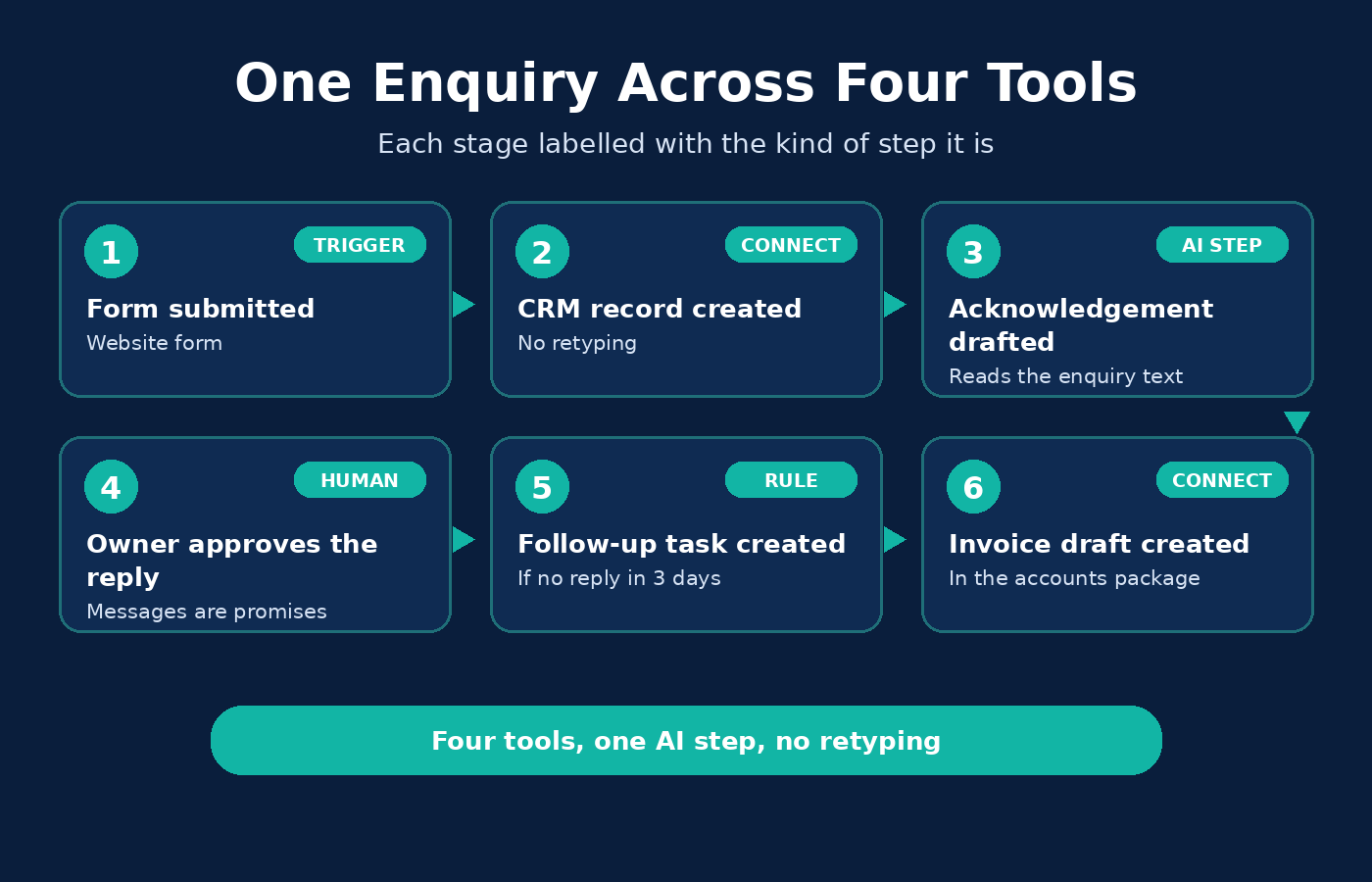
One enquiry across four tools, with each stage labelled by the kind of step it is. The example is illustrative.
What to automate first, and what to leave alone
Automate the handoffs that happen every day and follow the same shape each time. Form entries move into the CRM, confirmed orders move into the accounts package, the standard acknowledgement goes out, and follow-up tasks appear when replies go quiet.
Repetition plus a fixed shape is the test. Our earlier guide works through five complete workflows of this kind, in AI automation workflows for small businesses.
Leave a step alone for now when any of three things are true. The team still argues about how the step should be done, because automating an unsettled process produces the same disagreement at higher speed.
The input is different every time in ways that change the right answer. Or an error would be expensive and hard to spot after the fact. Those steps are candidates later, once the boring chain around them is running and trusted.
How connected workflows fail
Automations rarely fail loudly. Nothing crashes. The work simply stops arriving, or arrives wrong, and the discovery happens weeks later. Three failure shapes cover most of what goes wrong.
Silent stops. A password expires, a plan limit is reached, a field is renamed in one of the tools, and the chain halts at that step.
The fix is not better luck. It is the run log and a failure alert to the workflow’s owner, so a stop is noticed the day it happens.
Duplicates. A trigger fires twice, or a step retries and creates a second record, and now two versions of the same customer or order exist. Connections need a simple guard: check whether the record already exists before creating it.
Bad data, faithfully moved. The connection works perfectly and distributes a wrong value to every tool at once.
Automation spreads errors at exactly the speed it spreads correct data, which is why the checks belong inside the workflow rather than in someone’s memory. None of these are reasons to avoid connecting your tools. They are reasons the log, the owner and the failure queue are part of the first workflow’s design, not improvements to add after the first incident.
Frequently asked questions
Do my existing tools need an API for this to work?
Not always. Many business tools offer built-in integrations, connect through automation platforms without code, or can exchange data through scheduled exports and imports.
An API gives the most control and usually the most reliable connection, but it is one option among several. What matters is that the connection is supported and stays stable, not how it is labelled.
What happens when one of the connected tools goes down or changes?
The workflow should pause at that step or route the affected items to the owner’s queue, and the run log should show where it stopped. When the tool recovers, the queued items can be processed in order instead of being rebuilt from memory. This is why the log and the failure path are designed in from the start.
How many tools can one workflow connect?
There is no fixed limit, but every added tool adds a point of failure and a set of fields to keep consistent with the others. For a first workflow, two or three tools is a sensible scope. Longer chains are better built once the short ones have run reliably for a while.
Should we clean up our data before automating?
Only the parts the first workflow touches. You do not need a company-wide cleanup project before starting. Standardise the names, formats and required fields for the records this one process moves, and let the workflow’s checks flag the exceptions that remain.
Start with one chain of handoffs
For AI workflow automation for small business, the method is simple: pick the process with the most manual copying in it, draw it on one page, and sort every step into connect, rule, AI or human. Run the five readiness checks, and build the shortest version of that chain with a log, an owner and a failure queue.
Then let it run under supervision until the team trusts it, and widen from there. If you would like help mapping that first process and connecting the tools around it, talk to DevxerTech about workflow automation and bring one process your team copies between systems every day. Drawn on a single page, it is the best starting point for the conversation.

