
A customer says yes, and the team celebrates. Then the welcome email, the intake form, and the first tasks scatter across inboxes.
That gap is what customer onboarding automation for small business closes. It turns a signed deal into a clear path to first delivery, with no step left to memory.
This guide is for small business operations and account managers who run onboarding by hand and want a steadier start for every new customer. The direct answer is this: start from one trigger, give every step an owner, and name who handles the exception before it happens.
Why the days after yes matter most
The sale is won, but the customer has not yet seen value. That gap is where doubt grows, and where a slow start can sour a good sale.
Most onboarding delays are not big failures. They are small gaps: a missing login, an unanswered intake form, or a task no one owned.
Each gap is easy to miss on its own. Together they push the first delivery back, and the customer starts to wonder if they chose well.
Start with one trigger and one record
Pick one event that starts onboarding. A deal marked won in your CRM, or a signed agreement, works for most small teams.
That trigger should open one onboarding record. Client, package, scope, start date, and the first value milestone all live there.
One record stops the scramble. Staff stop asking who promised what, because the handover is written down in one place.
A tidy CRM makes this work. Our guide to AI CRM data entry shows how to turn enquiries into records your team can trust.
Build the journey in five stages
Map the path from yes to first delivery in five stages. Agreement, welcome, intake, kickoff tasks, and first delivery give every step a home.
Give each stage one owner and one clear finish line. A stage is done when its evidence exists, not when someone says it feels done.
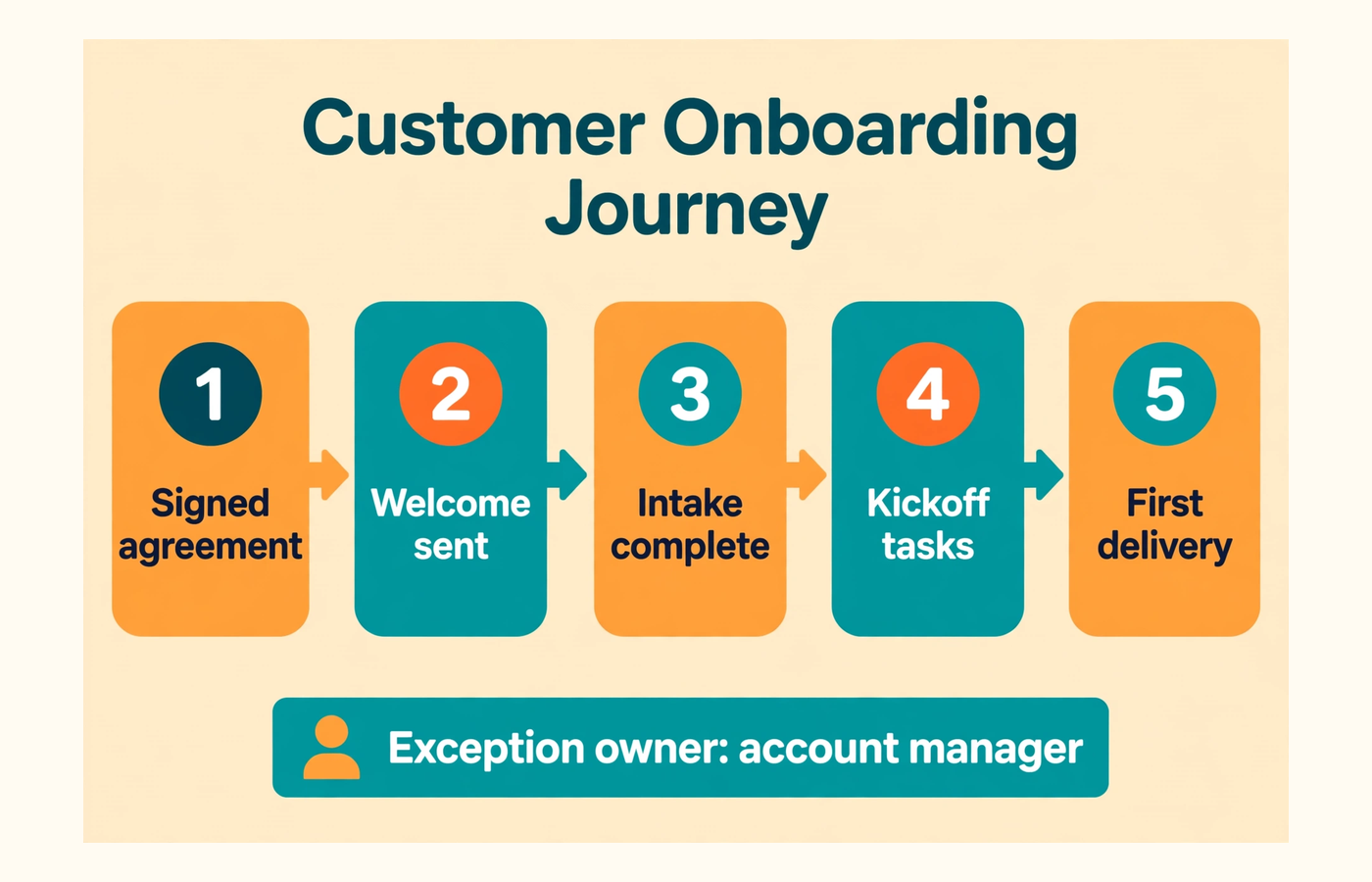
Five stages from yes to first delivery, with one named owner for exceptions.
Automate the steps that repeat the same way. Welcome messages, intake reminders, and task creation are good candidates for automation. For the wider picture, see our guide to AI workflow automation for small business, which covers choosing the right steps to automate first.
Keep the kickoff conversation human. Expectations, scope, and working preferences are set by people, not by a template. Illustrative example: a website support business asks for a signed agreement, a deposit, and working website access before any support starts.
Name the exception owner before you need one
Some customers will miss a document, need a different start date, or ask for help with access. Plan for that instead of hoping it will not happen.
Give every exception one named owner, usually the account manager. That person decides the alternative and records it in the onboarding record.
Set a simple rule for stalled steps. If intake is incomplete after three working days, the owner contacts the customer with a clear next step.
Exceptions are not failures. A clear route through them is what keeps a small team calm when a start does not go to plan.
A short review checklist for customer onboarding automation for small business
- One trigger starts it. A deal marked won or a signed agreement opens the onboarding record.
- One record holds it. Client, package, scope, and first value milestone live in one place.
- Every stage has an owner. Agreement, welcome, intake, kickoff, and first delivery each name one person.
- Start conditions are written. The team knows what must be true before delivery work begins.
- Exceptions have a route. A named owner decides the alternative and records it.
- First value is dated. The customer can see when the first useful result will arrive.
Frequently asked questions
Do we automate the welcome message? Yes, when the message is the same for every customer. Keep the kickoff call and any tricky conversation personal.
What if the customer never returns the intake form? The owner follows up on a set day with one clear ask. If it stays open, the exception route decides the next step.
Do we need new software to start? No. Start with your CRM, a shared checklist, and one trigger. Add automation to the repeated steps once the manual flow works.
A practical takeaway
A smooth start is a designed start. One trigger, one record, five stages, and a named owner for the exception keep onboarding steady.
Start with your next new customer. When customer onboarding automation for small business works there, widen it one service at a time. If you want an onboarding flow built around your services, triggers, and approval rules, talk to DevxerTech AI services about a setup that fits the way you work.

